read.me

Neovim Evangelist, Rewriting Dotfiles

coko's avatar

whoami | xargs -i cat intro_{}.txt

whoami

Who am I?

I'm @coko 👋


A french developer who’s passionate about programming and open-source.


Most of my time is spent in the terminal — where I rely on a variety of command-line tools to help me everyday: neovim, tmux/zellij, fzf, atuin, zoxide, sed, rg, jq, git, curl, xh, ssh, bat and many more…


Programming-wise, I like to experiment with many languages. I have been stuck on Rust 🦀 for a while, but I try to be versatile.


I have an interest in cyber-security: cryptography, authn|authz, IAM, OAuth, SAML, etc.


DevOps is also something I find myself playing with more and more: CI/CD, managing my home lab(s), self-hosting things with Docker, etc.

Jack of All Trades, Master of None.

Maybe. But also: I don't care ¯\_(ツ)_/¯

Life's no fun if you stick with the same pun (._. )

zola serve --open

zola serve

TTY Blog

Sometimes, I write stuff on my blog: The Terminal Yard (tty)


Latest posts:

* latuicon: the TUI icon picker from late.sh

* Custom Desktop Web Apps with Hyprland

* Vim Keymap For Markdown Links


RSS feed: blog.lazyfreax.dev/atom.xml

fd .git --type dir --hidden $HOME/projects

find projects -type d

Personal Projects

😴 latuicon/ TUI icon picker made with Ratatui
└── Neovim plugin: latuicon.nvim/

👒 vegapull/ One Piece TCG data scraper

⛵ boat/ CLI to track the time you spend on things
└── Companion bash script: boat-fleet/

⏳ aot/ Advent of Time browser game

🌍 MéMonde/ Geography guessing game (Play now!)

🏠 mataho/ CLI to interact with a local Tahoma box

🎨 kanumi/ Manage collection of images from the terminal

All my projects: github.com/coko7

pw-record terminal-tuesday-$(date +%y-%m-%d).wav

pw-record tt-$(date +%V).wav

Terminal Collective

I co-host a podcast called Terminal Tuesday with Orhun Parmaksız (ratatui btw), where we invite fellow terminal nerds to talk about their projects and setup.


We've had the chance to discuss with a lot of brilliant people all around the world about various topics relating to the terminal space.

✨ Checkout the latest episodes ✨

You can watch more episodes on YouTube.

Visit the Terminal Collective website to learn more.

cargo build --rewrite-the-freaking-wheel

cargo build -rtfw

Learning Projects

I like to try writing existing stuff from scratch.

It's a great way to learn how things work.


❌ DO NOT USE the following projects in production apps ( ͡° ͜ʖ ͡°)


💀 http-rs/ Raw-dogging TCP sockets to make an HTTP/1.1 server

🔐 huco705-rs/ Rust rewrite of my old huco705 cipher algorithm

✨ base64-rs/ b64 (en|de)coder from scratch

🧩 sudoku-rs/ Sudoku library from scratch (generator/checker/solver)


All RTFW projects: github.com/rtfw-rs

gh --stats --user=$(whoami)

gh --stats --user=$(whoami)

GitHub stats

I push my code to GitHub for simplicity. However, I also self-host my own instance of Forgejo: git.lazyfreax.dev

I use it mainly to mirror my GitHub projects.


The reason?

Well, you never know what Microsoft is up to so it's good to have a backup plan just in case 👀

glow $(locate '*env-config.md' | head -n 1)

glow env-config.md

Dotfiles & Config

🔧 .dotfiles/ All the .dotfiles that I use for my Linux config

🛠️ scripts/ My personal collection of shell scripts I rely on everyday

🚀 nvim-config/ My custom $EDITOR config -> nvim 0.12 rewrite (w.i.p)

🐧 my-floss/ Free/Libre Open-Source stuff I use

🏗️ archy-factory/ Automated Arch Linux install factory

😡 fwin/ PowerShell script to setup a Windows computer properly

Keyboards

I started using ergonomic keyboards in 2024 and haven't looked back ever since. A year after, I discovered Ergo-L and decided to adopt it as my daily layout.


I have had 3 different ergo keyboards in total:


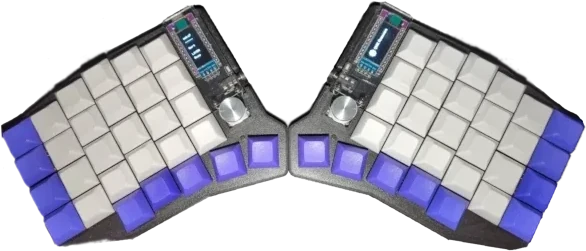
★ sofle/ QMK config for my first ergo keyboard (58 keys)

picture of a split Sofle ergonomic keyboard with 58 keys

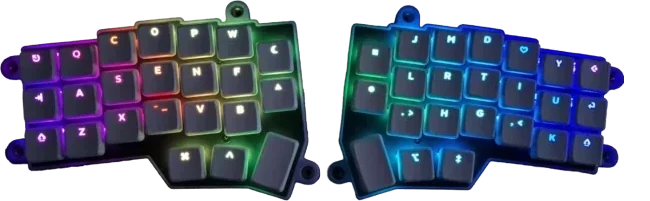
★ crkbd/ Vial config for my previous wired Corne (46 keys)

picture of a split Corne ergonomic keyboard with 46 keys

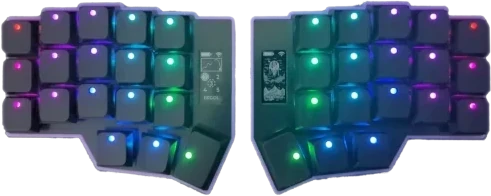
★ zmk-config/ ZMK config for my newest wireless Corne Pro (36 keys)

picture of a split Corne ergonomic keyboard with 36 keys

ssh homelab@127.0.0.1 -p 22 -i ~/.ssh/id_ed25519_hl

ssh homelab@localhost

Homelab

Hardware

* NAS for data replication and backup strategy

* Rasperry Pi 4 & 5 for hosting services

* Virtual Private Server (here)

Homelab illustration

Software

* Uptime Kuma for monitoring services

* rustypaste: self-hosted upload/pastebin service

* Personal git forge: Forgejo

* Private atuin.sh server to sync/backup shell history

* Self-hosted media server with Yamtrack

* Caddy/Nginx/Traefik as reverse proxies

* much more stuff actually... I will expand this section later

jq .coko.hobbies < info.json

jq . < hobbies.json

Hobbies

bat --style=plain --color=always world-building.md

bat -pf world-building.md

World-building

I have always loved drawing (on paper or w/ Gimp) and writing.

Even before getting my first computer, I was scribbling characters on my notebooks and writing manga.


For more than 10 years, I have been building my own fantasy worlds and stories. And recently, I decided to put all of them in a wiki of Markdown files, which I edit with Obsidian.


The graph below is a recent snapshot of the entire wiki.

Your browser doesn't support SVG
  • characters
  • locations
  • concepts
  • organizations
  • species
  • artifacts
  • drafts
  • timeline events
  • entity types
  • realms

The wiki is private ( ͡° ͜ʖ ͡°) and I don't really plan on making it public. (It's also a massive confusing mess that only makes sense to me…)
I am just happy writing and drawing for myself ᕕ( ᐛ )ᕗ


BTW: If you are into World Building and you like open source tools, you should checkout Chronicler.

nvim -o $(echo some,good,books.md | sed 's|,|_|g')

vi some_good_books.md

Some Good Books

I try to read books. Most of them are about programming (because I am addicted to this stuff). Some others about philosophy (Stoicism specifically) or discipline.


If you are looking for books on specific topics, there is the Mind Expanding Books awesome-list on GitHub, which is a great community-maintained index.


Anyway, here is my own list:

My notes/cheatsheets on Practical Vim: coko7/practical-vim-notes

zathura resumes/*.pdf

zathura resumes/*.pdf

Obtain my Resume


*Coming soon*

I'd like to setup some CDN and have it serve my resume(s) for fun.

For now, you can email me at contact@coko7.fr to get a fresh copy.

I only support english and français.


Surely this entire section wasn't just an excuse to make use of http.😼

rg social | awk print -F; '{$2,$3}'

grep social

Social handles

GitHub: code, programming and stuff

Forgejo: personal self-hosted git forge

Bluesky: I might post stuff here

LinkedIn: Professional stuff ¯\_(ツ)_/¯

Mastodon: gotta be more active there i guess

Twitter: my boring twitter

Twitch: I may stream once in a blue moon

daily.dev: i am there but also not really

Email: you can reach me at contact@coko7.fr